Open-source Tax Solver (OTS)- Project - https://sourceforge.net/projects/opentaxsolver/ OpenTaxSolver (OTS) is a free, safe + secure program for calculating Tax Form entries for Federal and State personal income taxes. It automatically fills-out and prints your forms for mailing.
News:Updated versions of OTS for the current tax-year (2025) have been posted for downloading. Taxes this year were due April 15, 2026. Tax forms for 2025 filed under extension will be due by October 15, 2026. Always check back here for updates.If you encounter any problems, then write to aston_roberts@yahoo.com. Please include in any messages: the version of OTS, your Operating System (OS), which Form(s), and how you are using OTS (by GUI or command-line). Always check back here periodically for updates and downloads.
Movies: OTS has two movies on Youtube:
Auto-Fillout: Saves time by filling out the answers onto the actual government PDF tax-forms. Auto-Fillout of PDF Forms is now available for all forms supported OTS (Federal & State). You will see the Auto-Fillout option when you click Print. All fields in the filled-out PDF forms can be changed or edited with Libre-Office Draw.
Mailing List:
General:
You can check the OTS Blog for status updates. All -updates, -notifications of issues, and -contributions of additional forms -- from you, the community -- are much appreciated! Special thanks again to all contributors.
OTS FaceBook Page:
Donate: OverviewThe OTS tax package is intended to be used with the Tax booklets published by your government for determining what numbers you need to enter, and then it assists you in doing the otherwise tedious calculations while showing the intermediate and final numbers. It takes care of the tedious and error-prone work.OTS is intended for those who are comfortable doing their own taxes - especially those who have previously done their taxes and basically understand how to fill out the forms. OTS does much of the math for you. The OTS_GUI is the default Graphical User Interface. The GUI allows you to conveniently enter tax data, and then invokes the appropriate text program when you press the Compute button. Alternatively, you can directly enter your tax data by editing the text files with your favorite text editor, and then process it by invoking the appropriate tax-solver program. Most people nowadays use the GUI, so that is the default mode according to instructions in the package. Behind the GUI is a text-window. It shows the actual commands the GUI uses when you press buttons. You can look at that, if you wish, to learn how to run the same commands directly from your command-line. Since the GUI is fairly self-explanatory, the detailed documentation focuses on how the core text programs work, for those interested.
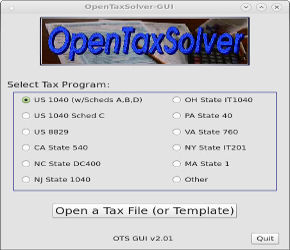
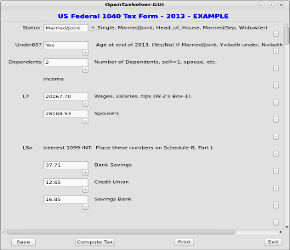
Example screen shots of OTS_GUI. Although originally created for US 1040 tax forms, the core routines have also been used to solve other tax forms, and for other countries or states. Some basic error checking is included. While the OTS programs developed over many years, results have often been checked against commercial packages. The answers produced by OTS typically matched to within a dollar or so, differing sometimes by rounding effects. Certainly your mileage may vary. Always double-check your tax forms!!
Documentation
Download OpenTaxSolverOpenTaxSolver for the current Tax Year (2025) can be downloaded from:Source code and compiled executables are available in all download packages. Example form-data files are included for all forms. Typical package size is about 10-30 MB (reasonably small by today's standards), which includes all the PDF forms. Prior year's versions are available at Downloads.
Unpacking
Tar packages contain precompiled executables for Linux (64-bit), and MacOSx.
Other Links
Feedback welcome.
Aston Roberts - aston_roberts@yahoo.com |




